
If you’ve ever done malware analysis, you know the feeling. You’ve got a suspicious file, and you know the answers are in there somewhere — what it does, how it hides, where it phones home. But getting to those answers means loading the file into one tool for the structure, switching to another for the decompiled code, firing up a third for signature matching, writing a quick script to decrypt something, and pasting results into a document. By the time you’ve got your answer, you’ve lost the thread three times.
That frustration is exactly why I started building Arkana.
What It Is
Arkana is an open-source malware analysis platform. It connects to an AI assistant and gives it access to 289 specialist analysis tools — covering everything from decompilation and signature matching to data decryption, interactive debugging, and code emulation. You describe what you want to know in plain English, and the AI picks the right combination of tools to get the answer.
It started life as a simple Windows executable parser called PeMCP. I wrote about it back in October. But it kept growing. It now handles Windows executables, Linux binaries, macOS programs, .NET applications, Go, Rust, and even raw shellcode — with dedicated analysis for each format.
How It Works in Practice
When you open a file, Arkana gets to work in the background before you even ask a question. It classifies the binary, scores the risk, checks it against known malware signatures and attack techniques, extracts network indicators and encryption keys, identifies library functions, and maps out the code — ranking functions by how suspicious they look.
By the time you ask your first question, the groundwork is already done. I’m absolutely terrible at keeping track of all of that manually. I’d get three hours deep into reversing a custom encryption routine and completely forget to go back and pull out the network indicators, or I’d finish the whole analysis and realise I never checked for code similarities against previous samples. Having all of the groundwork happen automatically means I actually get a complete picture for once, without relying on my own questionable organisational skills.
From there, you just investigate. Ask it to decrypt an encrypted payload. Step through a function with the built-in debugger. Compare code against previously analysed samples to spot reuse. Whatever you need — all through natural language, all in one place.
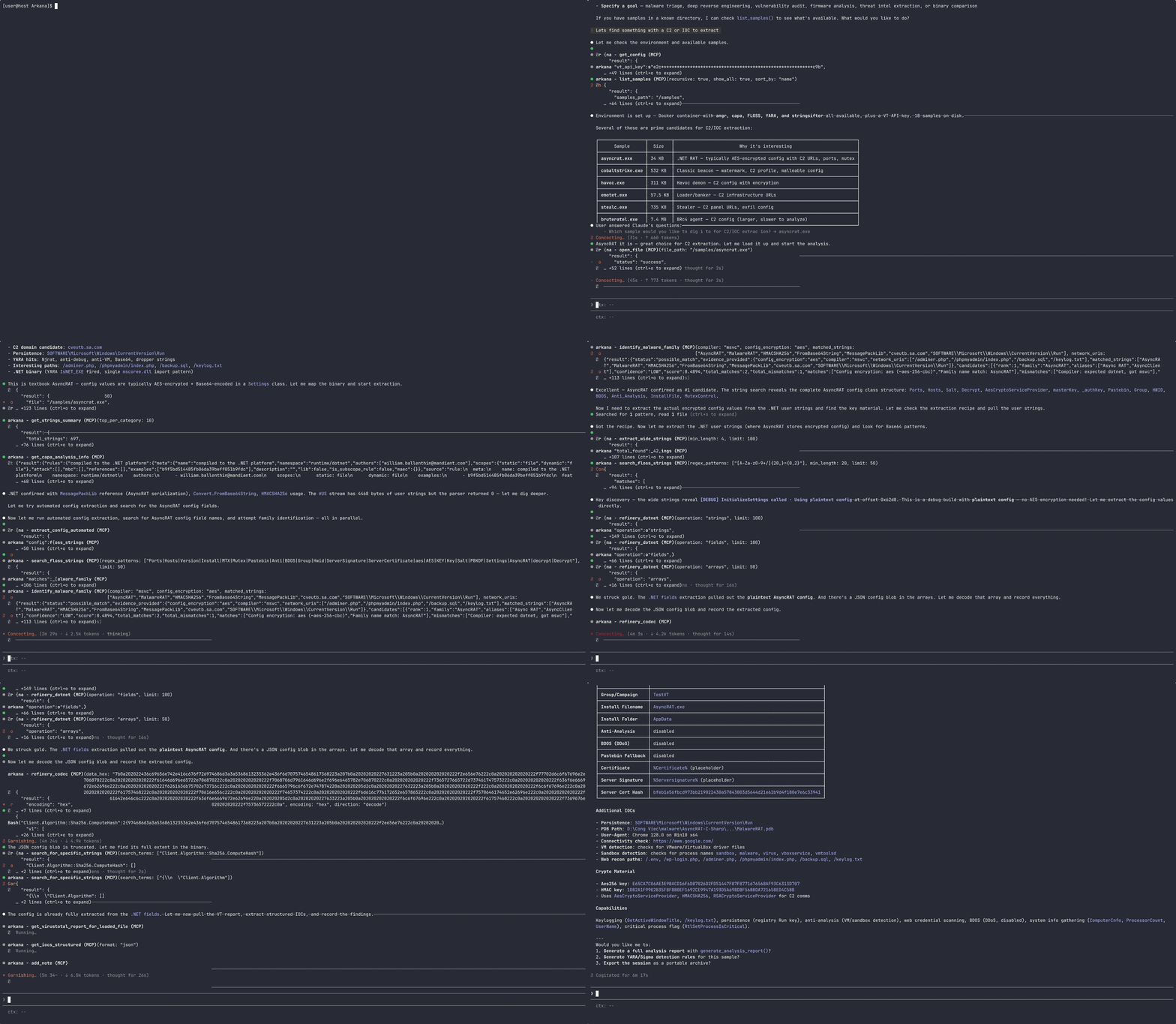
Here’s what that actually looks like. This is Arkana analysing a real remote access trojan called AsyncRAT — extracting the command-and-control server, encryption keys, and evasion techniques:
Tested on Real Malware
I haven’t just been building this — I’ve been using it. There are now 14 published analysis reports on the GitHub, and the samples weren’t cherry-picked. Several were grabbed fresh from Malware Bazaar on the day they were submitted, meaning nobody had published analysis yet.
The lineup includes LockBit ransomware, Brute Ratel (a commercial attack framework that real threat actors have adopted), four different remote access trojans, three credential stealers, a kernel exploit loader, and a couple of reverse engineering challenges that properly tested the limits.
Some highlights:
- One of the StealC variants was wrapped in seven layers of packing — a self-extracting archive, an obfuscated batch script, a program reassembled from four fragments, and multiple rounds of custom encryption. Arkana peeled through the lot.
- ValleyRAT used a completely custom encryption algorithm that nobody had documented before. The decompiler made the algorithm readable, and the built-in decryption tools handled the rest — no standalone scripts needed.
- CrySome RAT was completely unobfuscated, which made it more interesting. Full source recovery revealed a genuinely novel trick: it modifies the Windows Recovery partition to survive a factory reset.
- LockBit 3.0 straight-up won. The packing was so aggressive that static analysis could only dissect the unpacking mechanism, not the payload. That’s where you’d hand off to a sandbox — and that’s an honest limitation I’m upfront about.
I’ve written a deeper dive into all 14 analyses if you want the technical details.
The Dashboard
Alongside the AI-driven workflow, Arkana ships with a web-based dashboard — a visual overview of your analysis with interactive call graphs, string analysis with relevance ranking, a hex viewer, attack technique mapping, and a full timeline of your investigation session.
It’s got a retro green-on-black terminal look. Because if you’re going to stare at malware all day, it might as well look cool.
Have a Go
Arkana is free and open-source under the MIT licence. It runs in Docker — nothing to install on your machine — and you can be up and running in five commands. The project is backed by over 1,700 automated tests and is actively developed.
arkana.re — overview, features, and getting started
GitHub — source code, docs, and all 14 analysis reports
Get stuck in and let me know what you think. Feedback, questions, and bug reports are always welcome.
Leave a Reply